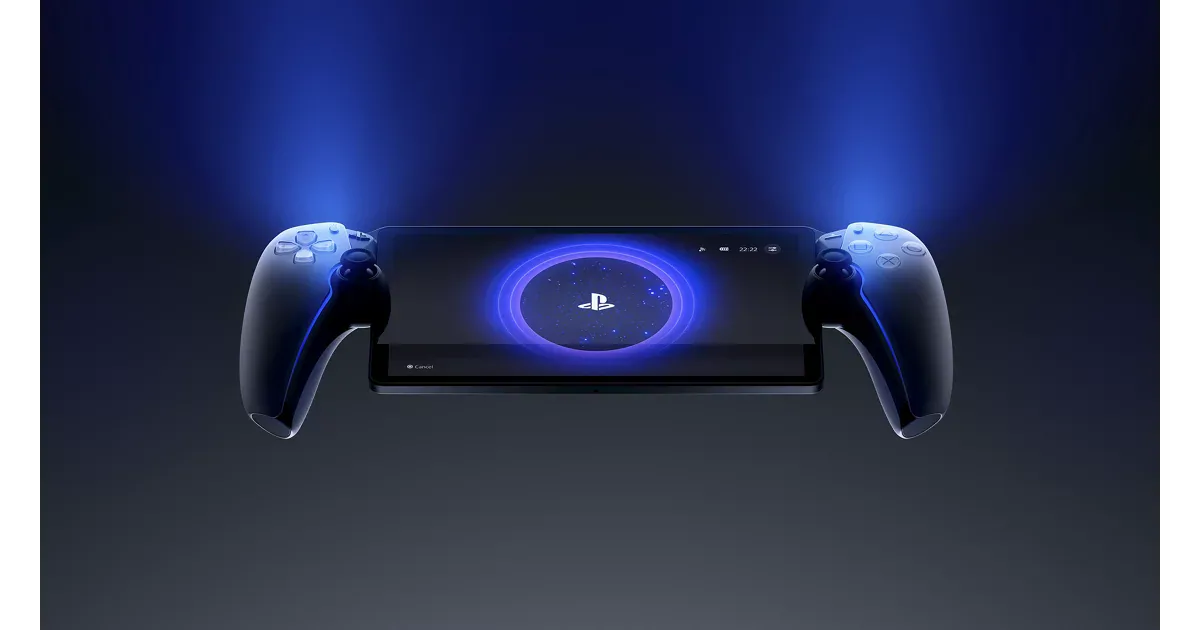
Product file

PlayStation Portal Remote Player

PlayStation Portal Remote Player is a narrow but useful pick for PS5 households that want a comfortable second-screen device with a large display and DualSense-style controls.

Brand
Sony Interactive Entertainment
Model
CFI-Y1016 / PlayStation Portal Remote Player
Category
Handheld Game Consoles
Updated
2026-05-15
Reviewed by
RankReason Editorial Desk
PlayStation Portal Remote Player
Image by Sony Interactive Entertainment

RankReason review

Editorial Review

Ranked #8 in Handheld Game Consoles · Score 78/100

Bottom line

PlayStation Portal ranks because it is excellent at one specific job: giving active PS5 households a comfortable second-screen device. Its large display and DualSense-style controls make more sense than a phone-controller setup, as long as the buyer understands it is not a standalone console.

Ranked eighth because it is excellent at one job: giving PS5 owners a comfortable second-screen handheld. The screen and DualSense-style controls beat phone-controller setups, but it is not a standalone console, and network/host-console conditions define the experience.

Buy it as a PS5 companion, not as a general handheld console. It makes sense for shared-TV homes and much less sense for travel-first or standalone-play buyers.

Sony’s Remote Play documentation and reviews agree on the narrow fit: Portal works best as a second-screen PS5 accessory for households already invested in PlayStation.

The large built-in display and DualSense-style controls are the hardware advantages reviewers most often cite when comparing Portal with phone-and-controller Remote Play setups.

PlayStation Portal Remote Player is strongest where It is a clear fit for PS5 owners who want couch, bed, or shared-TV play around the house, The large screen and DualSense-style controls are more comfortable and cohesive than many phone-based remote-play setups, For the intended household, the software path is simpler than managing a general-purpose Android or Windows handheld. Those strengths make it feel less like a spec-sheet pick and more like a product with a clear reason to exist in its category.

The main caveats are It does not run local games, so it cannot replace a Switch, Steam Deck, or PC handheld, Network quality, router behavior, and the PS5's state heavily shape the experience, Its library path is much narrower than Android, Nintendo, or PC alternatives. We would treat those as real buying filters rather than footnotes, especially if you are comparing it against cheaper or more specialized alternatives.

It makes the most sense for PS5 owners who want couch, bed, or second-screen play, Families sharing a TV with an existing PS5, Players who want low setup burden for PlayStation remote play, but it is less compelling for Travel-first buyers without reliable network conditions, Shoppers expecting local games.

What stands out

  • It is a clear fit for PS5 owners who want couch, bed, or shared-TV play around the house.
  • The large screen and DualSense-style controls are more comfortable and cohesive than many phone-based remote-play setups.
  • For the intended household, the software path is simpler than managing a general-purpose Android or Windows handheld.
  • Very clear PS5 remote-play fit
  • Large screen and DualSense-style controls
  • Simple for the intended household

Tradeoffs

  • It does not run local games, so it cannot replace a Switch, Steam Deck, or PC handheld.
  • Network quality, router behavior, and the PS5's state heavily shape the experience.
  • Its library path is much narrower than Android, Nintendo, or PC alternatives.
  • Not a standalone handheld console
  • Experience depends on network and PS5 state
  • Narrower than Android or PC handhelds

Who it is for

  • PS5 owners who want couch, bed, or second-screen play
  • Families sharing a TV with an existing PS5
  • Players who want low setup burden for PlayStation remote play

Who should skip it

  • Travel-first buyers without reliable network conditions
  • Shoppers expecting local games
  • PC, Nintendo, or broad cloud-service buyers

Product Snapshot

Pros

  • Very clear PS5 remote-play fit
  • Large screen and DualSense-style controls
  • Simple for the intended household

Cons

  • Not a standalone handheld console
  • Experience depends on network and PS5 state
  • Narrower than Android or PC handhelds

Source-backed Claims

PlayStation Portal is best for households that already own and actively use a PS5.

Sony’s Remote Play documentation and reviews agree on the narrow fit: Portal works best as a second-screen PS5 accessory for households already invested in PlayStation.

Confidence: high · Updated 2026-05-15

The large screen and DualSense-style controls are its clearest advantages over phone-controller setups.

The large built-in display and DualSense-style controls are the hardware advantages reviewers most often cite when comparing Portal with phone-and-controller Remote Play setups.

Confidence: high · Updated 2026-05-15

It is a remote-play handheld, not a standalone console replacement.

Sony’s own feature description makes the limitation explicit: Portal streams from a PS5 rather than running games locally, so it should not be treated as a standalone handheld console.

Confidence: high · Updated 2026-05-15